
When ransomware strikes an Active Directory environment, the initial response dictates whether the organization faces a minor outage or a total domain compromise. This step-by-step playbook outlines the critical containment actions required in the first 60 minutes.
The "First 60 Minutes" Goal
Ransomware (MITRE ATT&CK T1486) is typically the final payload in a broader attack chain. By the time files begin encrypting en masse, threat actors have often already escalated privileges and compromised Active Directory (AD).[2] The goal of the first 60 minutes is not to completely eradicate the threat, but to halt lateral movement, sever command-and-control (C2) access, and preserve at least one uncorrupted Domain Controller for recovery.[1]
Step 1: Out-of-Band Communication & Triage
Once ransomware is confirmed, standard internal communications are no longer secure. Threat actors frequently monitor internal email, collaboration platforms, and VoIP systems to intercept incident response plans and stay ahead of defenders.[2]
- Switch to Out-of-Band (OOB) Channels: Move all IR coordination to external, secure platforms immediately (e.g., Signal, separate tenant communications, or direct phone calls) to avoid tipping off attackers.[2]
- Scope the Blast Radius: Identify affected systems, paying special attention to virtualization hosts, identity providers, and backup servers. Early scoping prevents both under-response and over-containment.[2]
Step 2: Isolating the Compromised Environment
Immediate containment requires severing network access without destroying forensic evidence.
The Cybersecurity and Infrastructure Security Agency (CISA) explicitly recommends isolating affected systems at the network switch level rather than powering them down.[2] Powering down systems prematurely destroys volatile memory artifacts (RAM) that are essential for determining the initial access vector, identifying dropper malware, and recovering encryption keys.[2]
- Disconnect, Do Not Reboot: Unplug ethernet cables, disable Wi-Fi, or shut down switch ports for affected hosts.[2]
- Segment the Network: Use firewalls and routing rules to sever communication between different subnets, preventing ransomware from traversing the entire network. If multiple subnets are affected, take the network offline at the switch level.[2]
Step 3: Domain Controller & AD Specific Containment
Active Directory is the crown jewel for ransomware operators. If they control AD, they control the deployment mechanism (often via malicious Group Policy Objects) for the encryptors.
Microsoft's incident response playbook instructs defenders to immediately isolate at least one (ideally two) known-good Domain Controllers in every domain.[1] This means physically or logically disconnecting them from the network to preserve the identity infrastructure, but leaving them powered on.[1]
- Preserve the DC: If the isolated Domain Controller is a virtual machine, ensure the virtualization platform's system and data drives are backed up to offline external media immediately.[1]
- Disable Privileged Accounts: Immediately disable all privileged user accounts, leaving only a highly restricted, heavily monitored set of emergency accounts (break-glass accounts) active for your admins to use during recovery.[1]
Step 4: The KRBTGT Password Reset Procedure
If an attacker has compromised a Domain Admin account, they have likely dumped the NTDS.dit database and stolen the KRBTGT account hash. This allows them to forge Kerberos Ticket Granting Tickets (Golden Tickets). A Golden Ticket provides persistent, undetectable domain persistence even if all other user passwords in the domain are reset.[3]
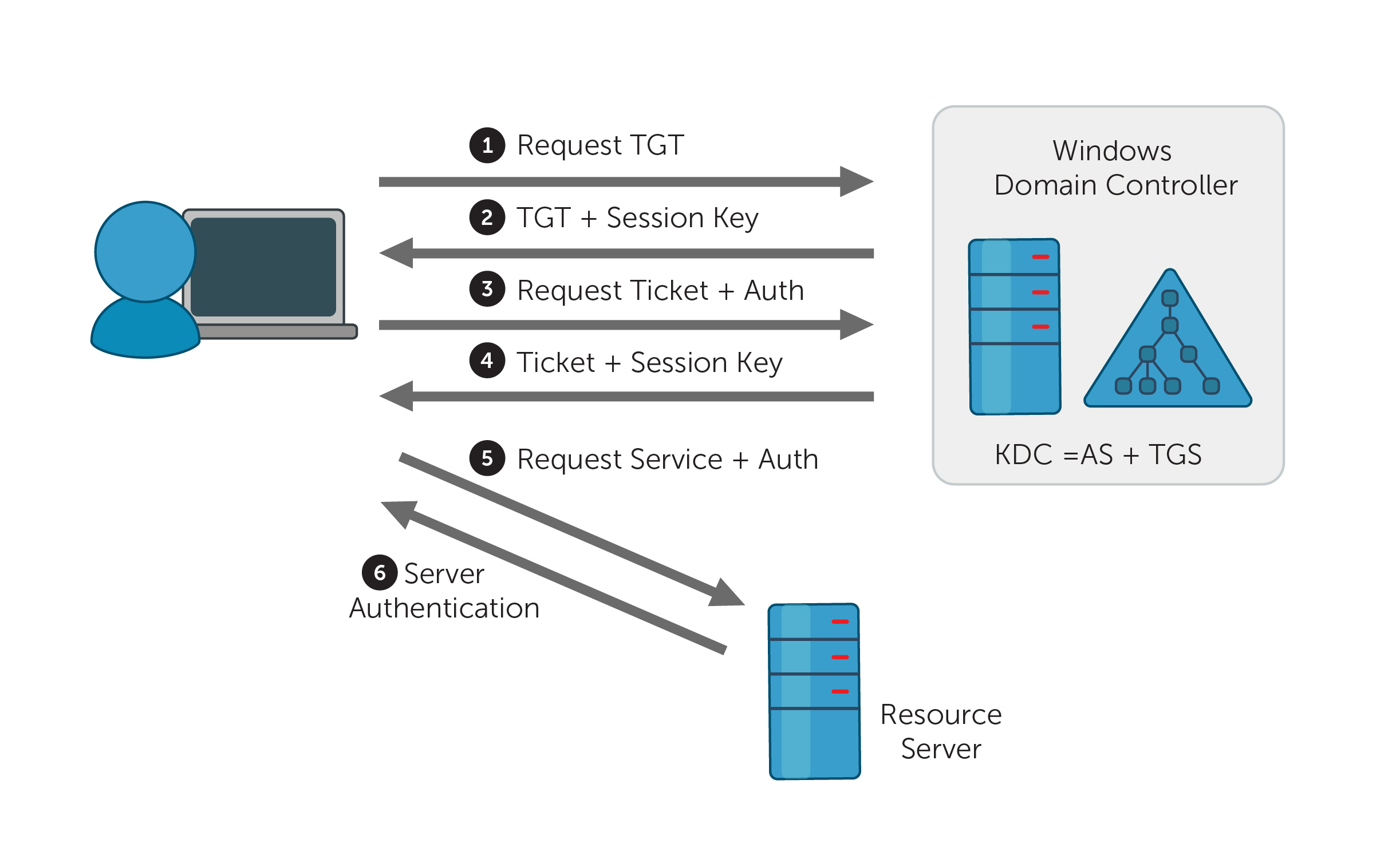
To revoke a Golden Ticket, the KRBTGT password must be reset. However, Active Directory intentionally retains the previous password history for the KRBTGT account to allow ongoing authentications to finish seamlessly. Therefore, resetting it just once is insufficient to stop an active attacker.[3]
| Action | Purpose | Wait Time Required |
|---|---|---|
| First Password Reset | Updates the current KRBTGT hash, moving the compromised hash to the history cache. | Immediate |
| AD Replication | Ensures all active Domain Controllers recognize the first password change. | Varies by topology |
| TGT Lifetime Expiration | Waits for any active Golden Tickets signed by the old hash to naturally expire. | 10+ Hours (Default) |
| Second Password Reset | Flushes the compromised hash out of the password history entirely, invalidating all older tickets. | Immediate (after expiration window) |
- The Double Reset: The password must be reset twice to fully flush the history cache and permanently invalidate existing forged tickets.[3]
- The Waiting Period: You cannot safely reset it twice back-to-back. You must reset it once, wait for the change to replicate across all Domain Controllers, and then wait for the Maximum TGT Lifetime to expire (which defaults to 10 hours in Windows domains).[3] Only after this window passes should you execute the second reset.[3]
Security organizations strongly advise against doing this manually under pressure. Using the Microsoft-originated PowerShell KRBTGT reset script (widely maintained on GitHub) is recommended to simulate and safely execute the resets without breaking the domain.[3]
Security Takeaway
The first 60 minutes of a ransomware attack dictate the cost and duration of the recovery. By establishing out-of-band communications, isolating hardware at the switch level, protecting a known-good Domain Controller, and properly executing a staggered KRBTGT password reset, incident responders can successfully halt the attack chain, strip attackers of their domain persistence, and pave the way for a secure eradication phase.
Sources & References
- [1] Microsoft — Microsoft Incident Response ransomware approach and best practices — December 12, 2024 — Verified source
- [2] Cybersecurity and Infrastructure Security Agency (CISA) — #StopRansomware Guide — Verified source
- [3] FRSecure — KRBTGT Password Reset Guide — Verified source
Technical Discussion & Feedback (0)
Leave a Comment (Authenticated Users)